これまでのダンジョンRPG制作で作成したものは以下の通りです。これを1つのスクリプトファイルで作ってきていました。しかし、これだと設計がひどい状態になっています。なぜなら、ダンジョン処理の中に街の処理やゴブリンと戦う処理などが1つになっているからです。
そこで今回は リファクタリング(設計の最適化) を行います。具体的には「戦闘システム」「ダンジョン」「街」などを完全に独立した部品として分割し、その部品をメインでコントロールするようにしていきます。
- ダンジョンの壁と床の設置
- プレイヤーの現在座標とその表記
- イベントメッセージの表示
- 敵とのランダムエンカウント
- ダンジョンの扉と階段の設置
- ダンジョンのB1から街に戻る処理
- ダンジョンのB1からB2に降りる処理
リファクタリング (設計の最適化)
今回はリファクタリングを行い、設計を最適な状態にしていきます。
- リファクタリングする理由
- 設計の最適化
リファクタリングする理由
extends Camera3D

enum Direction { NORTH, EAST, SOUTH, WEST }
enum GameState { EXPLORE, BATTLE, TOWN }

const MOVE_STEP: float = 2.0
const ROTATE_STEP: float = 90.0

const WALL_ITEM_ID: int = 1
const DOOR_ITEM_ID: int = 2
const STAIRS_DOWN_ITEM_ID: int = 3
const STAIRS_UP_ITEM_ID: int = 4

const MIN_SAFE_STEPS: int = 8
const BASE_ENCOUNTER_CHANCE: float = 0.02

const SFX_DOOR_OPEN = preload("res://door_open.mp3")
const SFX_STAIRS    = preload("res://stairs.mp3")

var current_grid_pos: Vector2i = Vector2i.ZERO
var current_dir: Direction = Direction.NORTH
var is_showing_message: bool = false
var triggered_events: Dictionary = {}
var steps_since_last_fight: int = 0
var current_state: GameState = GameState.EXPLORE
var opened_doors: Dictionary = {}
var current_floor: int = 1

var dungeon_start_position: Vector3
var dungeon_start_rotation: Vector3

# 💡 【完全確定データ】今後、階層や階段が増えたら「ここにデータを1行足すだけ」で動くマスター辞書
# 構造 ➔ Vector3i(踏んだ階段の座標): { "target_pos": Vector3i(ワープ先の座標), "target_floor": 移動先の階層 }
var STAIRS_LINK_DATA: Dictionary = {
	# --- B1F の階段定義 ---
	Vector3i(0, 0, 0): {
		"target_pos": Vector3i(0, 0, 0), # 街へ戻る階段(フロア0指定で街画面へ)
		"target_floor": 0
	},
	Vector3i(0, 0, -10): {
		"target_pos": Vector3i(0, 0, -14), # 💡 B1下り階段 ➔ B2上り階段の場所へワープ
		"target_floor": 2
	},

	# --- B2F の階段定義 ---
	Vector3i(0, 0, -14): {
		"target_pos": Vector3i(0, 0, -10), # 💡 B2上り階段 ➔ B1下り階段の真上へ(これでOKになります!)
		"target_floor": 1
	}

	# ※今後B3Fへの階段を作った際は、同様に「B2の下り座標」と「B3の上り座標」のペアをここに追記するだけで、システムは一切書き換えずに動作します。
}

@onready var grid_map: GridMap = $"../GridMap"
@onready var status_label: Label = $"../CanvasLayer/Label"
@onready var message_window: PanelContainer = $"../CanvasLayer/PanelContainer"
@onready var enemy_graphic: TextureRect = $"../CanvasLayer/EnemyGraphic"
@onready var sfx_player: AudioStreamPlayer = $SfxPlayer

@onready var town_graphic: TextureRect = $"../CanvasLayer/TownGraphic"
@onready var town_menu: VBoxContainer = $"../CanvasLayer/TownGraphic/TownMenu"
@onready var dungeon_button: Button = $"../CanvasLayer/TownGraphic/TownMenu/DungeonButton"

@onready var battle_text: Label = $"../CanvasLayer/PanelContainer/BattleMenu/BattleText"
@onready var attack_button: Button = $"../CanvasLayer/PanelContainer/BattleMenu/AttackButton"
@onready var auto_button: Button = $"../CanvasLayer/PanelContainer/BattleMenu/AutoButton"
@onready var flee_button: Button = $"../CanvasLayer/PanelContainer/BattleMenu/FleeButton"

func _ready() -> void:
	dungeon_start_position = global_position
	dungeon_start_rotation = global_rotation

	update_player_status()
	if message_window:
		message_window.hide()
	if enemy_graphic:
		enemy_graphic.hide()
	if town_graphic:
		town_graphic.hide()

	steps_since_last_fight = 0

	attack_button.pressed.connect(_on_attack_button_pressed)
	auto_button.pressed.connect(_on_auto_button_pressed)
	flee_button.pressed.connect(_on_flee_button_pressed)

	if dungeon_button:
		dungeon_button.pressed.connect(_on_dungeon_button_pressed)

func _unhandled_input(event: InputEvent) -> void:
	if not event.is_pressed() or event.is_echo():
		return

	if current_state == GameState.TOWN or current_state == GameState.BATTLE:
		return

	if is_showing_message:
		if event.is_action_pressed("move_forward"):
			close_message_window()
		return

	if event.is_action_pressed("move_forward"):
		try_move_direction(Vector3(0, 0, -1))
	elif event.is_action_pressed("move_backward"):
		try_move_direction(Vector3(0, 0, 1))
	elif event.is_action_pressed("move_left"):
		try_move_direction(Vector3(-1, 0, 0))
	elif event.is_action_pressed("move_right"):
		try_move_direction(Vector3(1, 0, 0))
	elif event.is_action_pressed("turn_left"):
		rotate_horizontal(ROTATE_STEP)
	elif event.is_action_pressed("turn_right"):
		rotate_horizontal(-ROTATE_STEP)

func try_move_direction(local_direction: Vector3) -> void:
	var direction_vector: Vector3 = global_transform.basis * local_direction
	direction_vector.y = 0
	direction_vector = direction_vector.normalized()

	var target_global_pos: Vector3 = global_position + (direction_vector * MOVE_STEP)
	var map_coord: Vector3i = grid_map.local_to_map(grid_map.to_local(target_global_pos))
	var cell_item_id: int = grid_map.get_cell_item(map_coord)

	if cell_item_id == WALL_ITEM_ID:
		return

	if cell_item_id == DOOR_ITEM_ID:
		if not opened_doors.has(map_coord):
			interact_with_door(map_coord)

	# 💡 【重要】移動する前の「古いマス座標」を記憶しておく
	var old_map_coord: Vector3i = grid_map.local_to_map(grid_map.to_local(global_position))

	# プレイヤーを実際に移動させる
	global_position = target_global_pos
	update_player_status()

	# 移動した後の「新しいマス座標」を取得
	var current_map_coord: Vector3i = grid_map.local_to_map(grid_map.to_local(global_position))
	var current_cell_id: int = grid_map.get_cell_item(current_map_coord)

	# 💡 【解決策】「前いたマス」と「今いるマス」が違う(=別のマスに足を踏み入れた)時だけ階段を判定する
	if current_map_coord != old_map_coord:
		if current_cell_id == STAIRS_DOWN_ITEM_ID or current_cell_id == STAIRS_UP_ITEM_ID:
			teleport_by_stairs(current_map_coord)
			return

	if current_cell_id == DOOR_ITEM_ID and not opened_doors.has(current_map_coord):
		return

	var event_triggered: bool = check_coordinate_event()
	if not event_triggered:
		check_random_encounter()

func interact_with_door(door_coord: Vector3i) -> void:
	opened_doors[door_coord] = true
	if sfx_player and SFX_DOOR_OPEN:
		sfx_player.stream = SFX_DOOR_OPEN
		sfx_player.play()
	grid_map.set_cell_item(door_coord, GridMap.INVALID_CELL_ITEM)

# 💡 データ駆動型:踏んだ座標を元に行先を自動判定する汎用ワープシステム
func teleport_by_stairs(current_stair_coord: Vector3i) -> void:
	if not STAIRS_LINK_DATA.has(current_stair_coord):
		print("未定義の階段座標です: ", current_stair_coord)
		return

	steps_since_last_fight = 0

	if sfx_player and SFX_STAIRS:
		sfx_player.stream = SFX_STAIRS
		sfx_player.play()

	var data: Dictionary = STAIRS_LINK_DATA[current_stair_coord]
	var next_floor: int = data["target_floor"]
	var next_pos: Vector3i = data["target_pos"]

	if next_floor == 0:
		# 🏰 街への帰還
		current_state = GameState.TOWN
		if town_graphic:
			town_graphic.show()
		if dungeon_button:
			dungeon_button.grab_focus()
		print("街モードに切り替わりました。")
	else:
		# 🕳️ 階層移動(上り・下りを自動判定してメッセージを分岐)
		var old_floor: int = current_floor
		current_floor = next_floor

		# 💡【重要】GridMapのローカル中心座標を取得し、それをグローバル3D座標に変換する
		var local_target_pos: Vector3 = grid_map.map_to_local(next_pos)
		var global_target_pos: Vector3 = grid_map.to_global(local_target_pos)

		# 💡 プレイヤーの3D位置を確実にワープ先へ書き換える
		global_position = global_target_pos

		# 💡 Godot内部の位置トランスフォームをこの瞬間に強制同期させる(同期ズレの防止)
		force_update_transform()

		# 💡 自動計算のズレを防ぐため、UI用の2Dマス座標も直接ワープ先の数値で上書き確定させる
		current_grid_pos = Vector2i(next_pos.x, next_pos.z)

		if current_floor > old_floor:
			show_explore_message("階段を下りた…… 🕳️\nここは B%d だ。\n\n(Wボタンでメッセージを閉じる)" % current_floor)
		else:
			show_explore_message("階段を上った…… 🧗\nここは B%d だ。\n\n(Wボタンでメッセージを閉じる)" % current_floor)

	# 💡 同期を強制した後に、向きなどのステータスを更新する
	update_player_status()

func _on_dungeon_button_pressed() -> void:
	if current_state != GameState.TOWN:
		return

	if sfx_player and SFX_STAIRS:
		sfx_player.stream = SFX_STAIRS
		sfx_player.play()

	current_state = GameState.EXPLORE
	current_floor = 1

	if town_graphic:
		town_graphic.hide()

	global_position = dungeon_start_position
	global_rotation = dungeon_start_rotation
	steps_since_last_fight = 0

	update_player_status()
	print("再びダンジョン(B1)に入りました。")

func rotate_horizontal(deg: float) -> void:
	rotate_y(deg_to_rad(deg))
	update_player_status()

func update_player_status() -> void:
	if not is_inside_tree():
		return

	var map_coord: Vector3i = grid_map.local_to_map(grid_map.to_local(global_position))
	current_grid_pos = Vector2i(map_coord.x, map_coord.z)

	var forward_vector: Vector3 = -global_transform.basis.z

	if abs(forward_vector.z) > abs(forward_vector.x):
		if forward_vector.z < -0.5:
			current_dir = Direction.NORTH
		else:
			current_dir = Direction.SOUTH
	else:
		if forward_vector.x > 0.5:
			current_dir = Direction.EAST
		else:
			current_dir = Direction.WEST

	update_ui_display()

func update_ui_display() -> void:
	if status_label == null:
		return

	if current_state == GameState.TOWN:
		status_label.text = "TOWN | 拠点に滞年中"
		return

	var dir_string: String = ""
	match current_dir:
		Direction.NORTH: dir_string = "北"
		Direction.EAST:  dir_string = "東"
		Direction.SOUTH: dir_string = "南"
		Direction.WEST:  dir_string = "西"

	status_label.text = "B%d | 現在地: (X: %d, Y: %d) | 向き: %s" % [current_floor, current_grid_pos.x, current_grid_pos.y, dir_string]

func check_coordinate_event() -> bool:
	var events: Dictionary = {
		Vector2i(0, -2): {
			"message": "「前方に不気味な気配を感じる…」\n\n(Wボタンで閉じる)",
			"is_repeatable": false
		},
		Vector2i(2, -4): {
			"message": "壁に血文字が刻まれている。\n『引き返せ、この先は深淵なり』\n\n(Wボタンで閉じる)",
			"is_repeatable": false
		},
		Vector2i(1, -1): {
			"message": "足元でカチリと音がした!\nピピッ!マスの罠が作動した!\n\n(Wボタンで閉じる)",
			"is_repeatable": true
		}
	}

	if not events.has(current_grid_pos):
		return false

	var event_data: Dictionary = events[current_grid_pos]

	if not event_data["is_repeatable"]:
		if triggered_events.has(current_grid_pos) and triggered_events[current_grid_pos] == true:
			return false

	show_explore_message(event_data["message"])

	if not event_data["is_repeatable"]:
		triggered_events[current_grid_pos] = true

	return true

func check_random_encounter() -> void:
	steps_since_last_fight += 1
	if steps_since_last_fight <= MIN_SAFE_STEPS:
		return

	var current_chance: float = BASE_ENCOUNTER_CHANCE * (steps_since_last_fight - MIN_SAFE_STEPS)
	var roll: float = randf()

	print("歩数: %d | 遭遇確率: %d%% | 出目: %d%%" % [steps_since_last_fight, int(current_chance * 100), int(roll * 100)])

	if roll < current_chance:
		trigger_battle_encounter()

func show_explore_message(text: String) -> void:
	battle_text.text = text
	attack_button.hide()
	auto_button.hide()
	flee_button.hide()
	message_window.show()
	is_showing_message = true

func trigger_battle_encounter() -> void:
	current_state = GameState.BATTLE
	steps_since_last_fight = 0

	battle_text.text = "ゴブリンが現れた!\nコマンドを選択してください。"
	attack_button.show()
	auto_button.show()
	flee_button.show()

	message_window.show()

	if enemy_graphic:
		enemy_graphic.show()

	attack_button.grab_focus()

func close_message_window() -> void:
	message_window.hide()
	is_showing_message = false

func _on_attack_button_pressed() -> void:
	if current_state != GameState.BATTLE: return
	battle_text.text = "パーティメンバーのコマンドへ (未実装)"

func _on_auto_button_pressed() -> void:
	if current_state != GameState.BATTLE: return
	battle_text.text = "オートバトルへ (未実装)"

func _on_flee_button_pressed() -> void:
	if current_state != GameState.BATTLE: return
	current_state = GameState.EXPLORE
	message_window.hide()
	if enemy_graphic:
		enemy_graphic.hide()
	print("無事に逃げ切った!探索に戻ります。")
今までダンジョンRPGを1つのファイルで作ろうとしてきました。これは後々無理が出てきます。
今まで使ってきたスクリプトファイル (camera_3d.gd) は上記の通りです。これでも動くのですが、camera のファイルに「敵の処理」「街の処理」などが含まれています。これはプログラミング的にはマズい状態です。camera のファイルなのに敵や街の処理をするのはわかりにくいし、メンテナンスもしにくいからです。そのため、後の工程のためにも、これをリファクタリングして修正していきます。
設定の最適化
リファクタリングする場合、現在動いているコードを壊さないようにする必要があります。今はメインシーン (main.tscn) はありますが、そのノードである Camera3D (camera_3d.gd) にすべての処理をおっかぶせている状態です。その状態をやめて以下のように設計しなおします。
| main.gd (main.tscn) |
ゲーム全体のコントローラー。街・探索・戦闘のシーンを切り替えるもの。main.tscn は存在しているが、main.gd がない状態です。 |
| dungeon.gd | ダンジョン探索専用。 3D移動、歩数計算、階段ワープ。今まで camera_3d.gd が担ってきたものを名前を変更して、ダンジョン探索用に生まれ変わらせます。 |
| town.gd | 街の処理専用。 拠点画面、宿屋やダンジョン突入ボタンのUI操作。これは main.tscn (main.gd) に呼び出されるものです。 |
| battle.gd | 戦闘専用。 敵の出現、攻撃コマンド、勝敗判定。これは main.tscn (main.gd) に呼び出されるものです。 |
メインコントローラー (main.gd) の作成
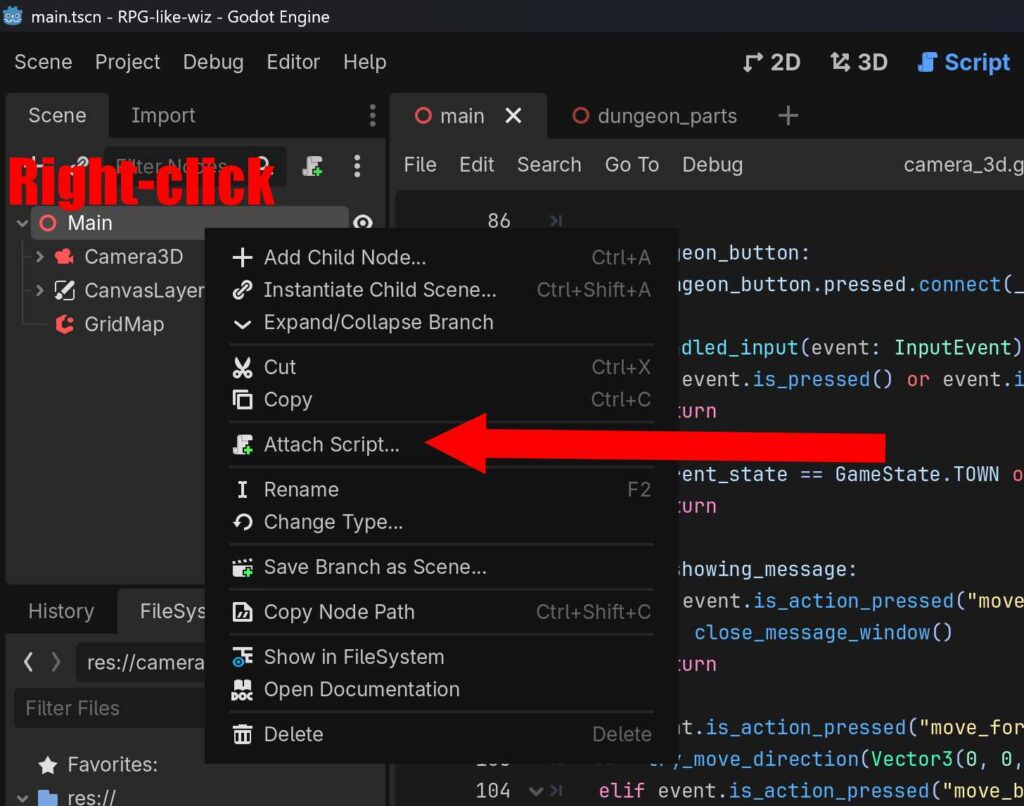
main シーンを右クリックし、Attach Script を選択します。
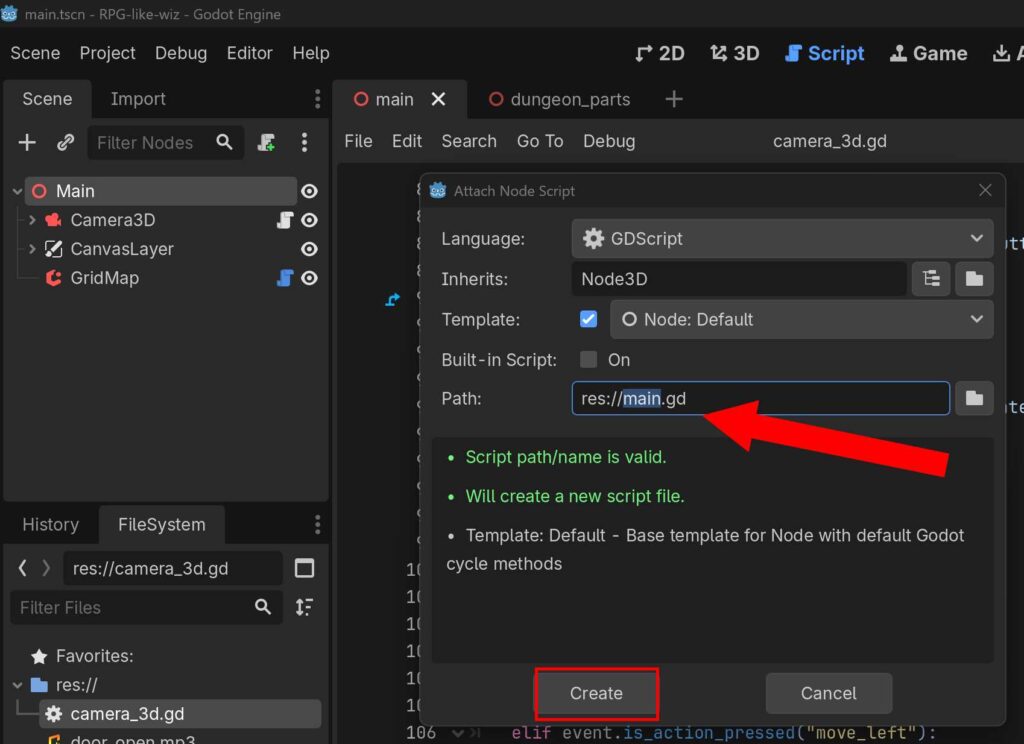
main.gd を作成してください。
# ==============================================================================
# main.gd : ゲーム全体(街 / 探索 / 戦闘)の状態を統括するコントローラー
# ==============================================================================
extends Node

enum GameState { EXPLORE, BATTLE, TOWN }
var current_state: GameState = GameState.EXPLORE

var town_system: TownSystem
var battle_system: BattleSystem

# 子ノード(Camera3D)への参照を取得(後ほど中身をdungeon.gdに書き換えます)
@onready var dungeon_explore: Camera3D = $Camera3D

func _ready() -> void:
	print("【Main】コントローラー起動。")

	# 各専門システムを生成(自分自身「self」を渡してUIと紐付ける)
	town_system = TownSystem.new(self)
	battle_system = BattleSystem.new(self)

	# dungeon.gd からのイベント合図(シグナル)を検知できるように繋ぐ
	dungeon_explore.battle_triggered.connect(_on_battle_triggered)
	dungeon_explore.town_entered.connect(_on_town_entered)

	# 各システムからの「終わったよ」の合図を繋ぐ
	town_system.dungeon_entered.connect(_on_dungeon_entered)
	battle_system.battle_finished.connect(_on_battle_finished)

	# 探索モードからゲームを開始
	_change_state(GameState.EXPLORE)

func _change_state(next_state: GameState) -> void:
	current_state = next_state

	# 一度すべてのモードを終了(非表示・無効化)させる
	town_system.end_town_mode()
	battle_system.end_battle_mode()
	dungeon_explore.set_explore_active(false)

	# 現在の状態に応じて、対象のシステムだけを起動する
	match current_state:
		GameState.EXPLORE:
			dungeon_explore.set_explore_active(true)
		GameState.TOWN:
			town_system.start_town_mode()
		GameState.BATTLE:
			battle_system.start_battle()

# --- 各システムからの合図(シグナル)を受けて状態を切り替える内部関数 ---

func _on_battle_triggered() -> void:
	_change_state(GameState.BATTLE)

func _on_battle_finished() -> void:
	_change_state(GameState.EXPLORE)

func _on_town_entered() -> void:
	_change_state(GameState.TOWN)

func _on_dungeon_entered() -> void:
	dungeon_explore.reset_to_dungeon_start()
	_change_state(GameState.EXPLORE)
main.gd にデフォルトで書かれているものを消して、上記コードを記述してください。
街の処理と戦闘処理がまだなので、上記コードを記述した段階ではエラーが出ます。一旦、次の工程に進んでください。
街の処理用 (town.gd) の作成
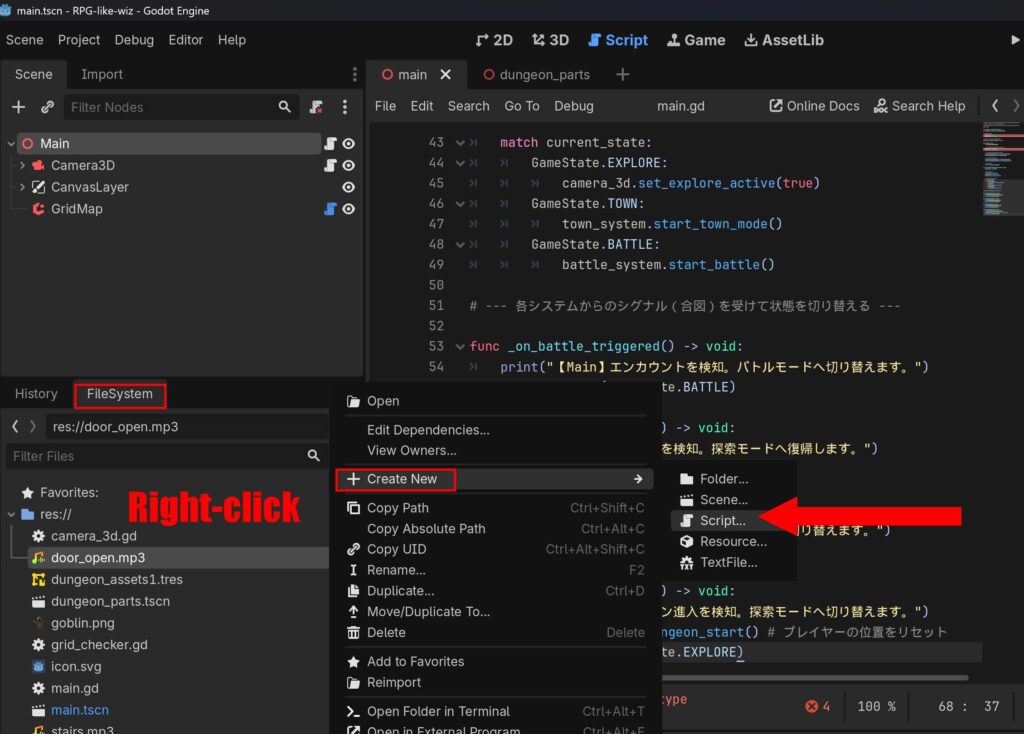
FileSystem を右クリックし、新規作成から Script を選択します。
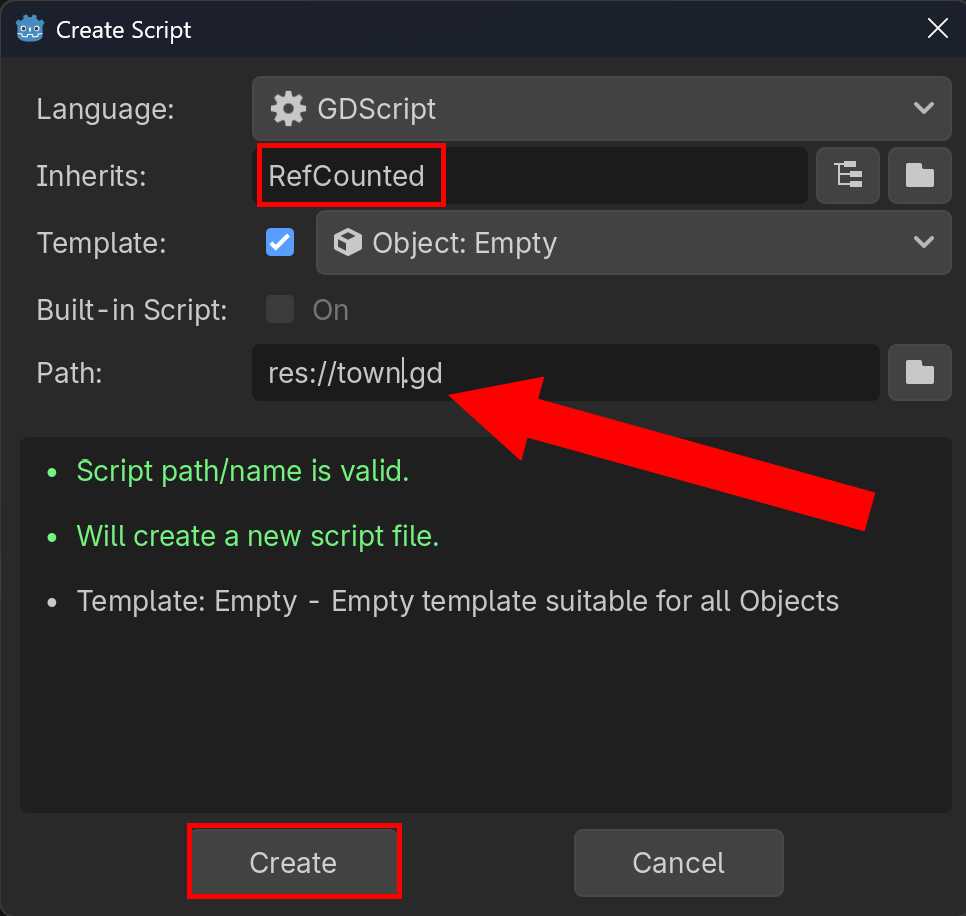
Inherits を RefCounted、Path を res://town.gd にして、スクリプトファイルを新規に作成してください。
# ==============================================================================
# town.gd : 拠点(街)のUI操作と処理だけを担当するクラス
# ==============================================================================
class_name TownSystem
extends RefCounted

var town_graphic: TextureRect
var dungeon_button: Button

# 💡 生成時にCamera3Dから必要なUIの参照を受け取る
func _init(camera_node: Camera3D) -> void:
	town_graphic = camera_node.get_node_or_null("../CanvasLayer/TownGraphic")
	dungeon_button = camera_node.get_node_or_null("../CanvasLayer/TownGraphic/TownMenu/DungeonButton")

# 🏰 街モードの開始処理
func start_town_mode() -> void:
	if town_graphic: town_graphic.show()
	if dungeon_button: dungeon_button.grab_focus()
	print("【Town】街モードが有効になりました。")

# 🏰 街モードの終了処理
func end_town_mode() -> void:
	if town_graphic: town_graphic.hide()
新規に作成された town.gd スクリプトファイルには上記コードを記述し、保存してください。
戦闘処理用 (battle.gd) の作成
# ==============================================================================
# battle.gd : 戦闘の進行、コマンド操作だけを担当するクラス
# ==============================================================================
class_name BattleSystem
extends RefCounted

signal battle_finished

var message_window: PanelContainer
var battle_text: Label
var attack_button: Button
var auto_button: Button
var flee_button: Button
var enemy_graphic: TextureRect

func _init(main_node: Node) -> void:
	# ルートであるMainから、CanvasLayer内にある戦闘UIの参照を取得
	message_window = main_node.get_node_or_null("CanvasLayer/PanelContainer")
	battle_text = main_node.get_node_or_null("CanvasLayer/PanelContainer/BattleMenu/BattleText")
	attack_button = main_node.get_node_or_null("CanvasLayer/PanelContainer/BattleMenu/AttackButton")
	auto_button = main_node.get_node_or_null("CanvasLayer/PanelContainer/BattleMenu/AutoButton")
	flee_button = main_node.get_node_or_null("CanvasLayer/PanelContainer/BattleMenu/FleeButton")
	enemy_graphic = main_node.get_node_or_null("CanvasLayer/EnemyGraphic")

	if attack_button: attack_button.pressed.connect(_on_attack_button_pressed)
	if flee_button: flee_button.pressed.connect(_on_flee_button_pressed)

func start_battle() -> void:
	if battle_text: battle_text.text = "ゴブリンが現れた!\nコマンドを選択してください。(独立バトルシステム)"
	if attack_button: attack_button.show()
	if auto_button: auto_button.show()
	if flee_button: flee_button.show()
	if message_window: message_window.show()
	if enemy_graphic: enemy_graphic.show()
	if flee_button: flee_button.grab_focus()

func end_battle_mode() -> void:
	if message_window: message_window.hide()
	if enemy_graphic: enemy_graphic.hide()

func _on_attack_button_pressed() -> void:
	if battle_text: battle_text.text = "ゴブリンに 5 のダメージを与えた!"

func _on_flee_button_pressed() -> void:
	print("【Battle】無事に逃げ切った!")
	battle_finished.emit()
同様に戦闘用スクリプトファイル (battle.gd) を作成してください。
| Path | res://battle.gd |
| Inherits | RefCounts |
camera_3d.gd の名前変更・コード修正
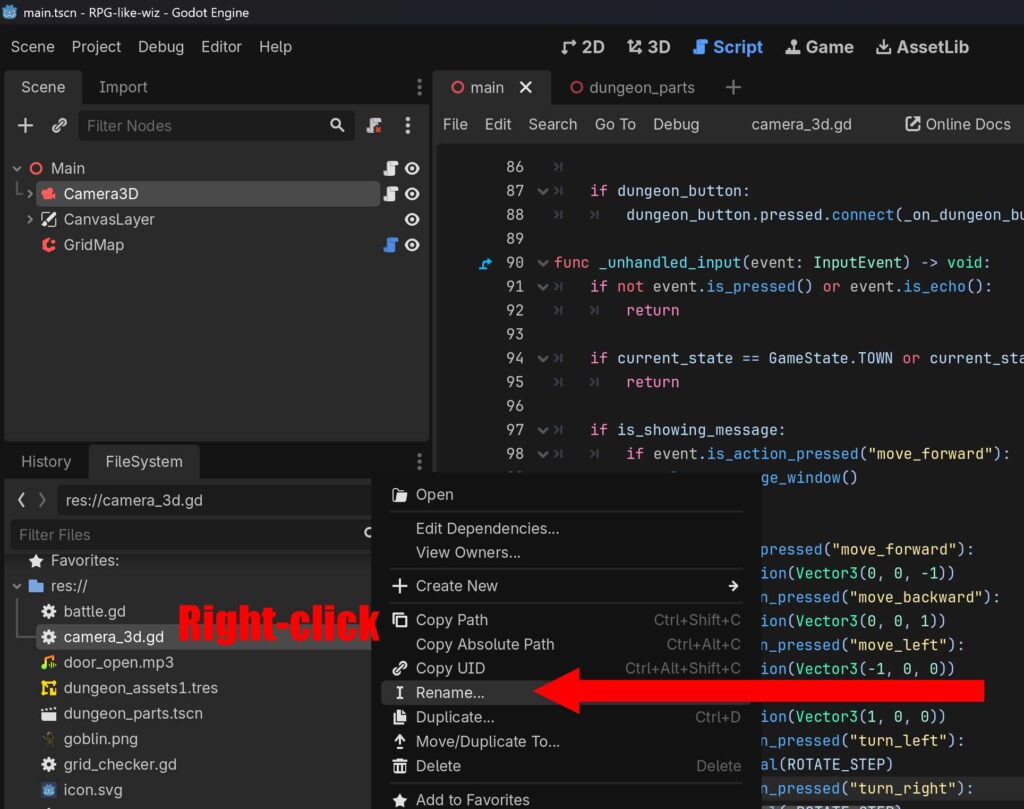
camera_3d.gd を右クリックして Rename を選択し、名前を dungeon.gd に変更してください。
| 旧 | camera_3d.gd |
| 新 | dungeon.gd |
# ==============================================================================
# dungeon.gd : 3D移動・歩数計算・階段ワープに完全特化したスクリプト(修正版)
# ==============================================================================
class_name DungeonExplore
extends Camera3D

signal battle_triggered
signal town_entered

enum Direction { NORTH, EAST, SOUTH, WEST }

const MOVE_STEP: float = 2.0
const ROTATE_STEP: float = 90.0

const WALL_ITEM_ID: int = 1
const DOOR_ITEM_ID: int = 2
const STAIRS_DOWN_ITEM_ID: int = 3
const STAIRS_UP_ITEM_ID: int = 4

const MIN_SAFE_STEPS: int = 8
const BASE_ENCOUNTER_CHANCE: float = 0.02

const SFX_DOOR_OPEN = preload("res://door_open.mp3")
const SFX_STAIRS    = preload("res://stairs.mp3")

var current_grid_pos: Vector2i = Vector2i.ZERO
var current_dir: Direction = Direction.NORTH
var is_showing_message: bool = false
var is_explore_active: bool = false
var triggered_events: Dictionary = {}
var steps_since_last_fight: int = 0
var opened_doors: Dictionary = {}
var current_floor: int = 1

var dungeon_start_position: Vector3
var dungeon_start_rotation: Vector3

var STAIRS_LINK_DATA: Dictionary = {
	Vector3i(0, 0, 0): { "target_pos": Vector3i(0, 0, 0), "target_floor": 0 },
	Vector3i(0, 0, -10): { "target_pos": Vector3i(0, 0, -14), "target_floor": 2 },
	Vector3i(0, 0, -14): { "target_pos": Vector3i(0, 0, -10), "target_floor": 1 }
}

@onready var grid_map: GridMap = $"../GridMap"
@onready var status_label: Label = $"../CanvasLayer/Label"
@onready var message_window: PanelContainer = $"../CanvasLayer/PanelContainer"
@onready var battle_text: Label = $"../CanvasLayer/PanelContainer/BattleMenu/BattleText"
@onready var sfx_player: AudioStreamPlayer = $SfxPlayer

# 💡 階段メッセージ表示時に戦闘ボタンを隠すための参照
@onready var attack_button: Button = $"../CanvasLayer/PanelContainer/BattleMenu/AttackButton"
@onready var auto_button: Button = $"../CanvasLayer/PanelContainer/BattleMenu/AutoButton"
@onready var flee_button: Button = $"../CanvasLayer/PanelContainer/BattleMenu/FleeButton"

func _ready() -> void:
	dungeon_start_position = global_position
	dungeon_start_rotation = global_rotation
	steps_since_last_fight = 0
	update_player_status()

func set_explore_active(active: bool) -> void:
	is_explore_active = active
	if is_explore_active:
		update_player_status()
	else:
		if status_label: status_label.text = "TOWN | 拠点に滞年中"

func reset_to_dungeon_start() -> void:
	current_floor = 1
	global_position = dungeon_start_position
	global_rotation = dungeon_start_rotation
	steps_since_last_fight = 0

func _unhandled_input(event: InputEvent) -> void:
	if not event.is_pressed() or event.is_echo(): return
	if not is_explore_active: return

	if is_showing_message:
		if event.is_action_pressed("move_forward"):
			close_message_window()
		return

	if event.is_action_pressed("move_forward"):
		try_move_direction(Vector3(0, 0, -1))
	elif event.is_action_pressed("move_backward"):
		try_move_direction(Vector3(0, 0, 1))
	elif event.is_action_pressed("move_left"):
		try_move_direction(Vector3(-1, 0, 0))
	elif event.is_action_pressed("move_right"):
		try_move_direction(Vector3(1, 0, 0))
	elif event.is_action_pressed("turn_left"):
		rotate_horizontal(ROTATE_STEP)
	elif event.is_action_pressed("turn_right"):
		rotate_horizontal(-ROTATE_STEP)

func try_move_direction(local_direction: Vector3) -> void:
	var direction_vector: Vector3 = global_transform.basis * local_direction
	direction_vector.y = 0
	direction_vector = direction_vector.normalized()

	var target_global_pos: Vector3 = global_position + (direction_vector * MOVE_STEP)
	var map_coord: Vector3i = grid_map.local_to_map(grid_map.to_local(target_global_pos))
	var cell_item_id: int = grid_map.get_cell_item(map_coord)

	if cell_item_id == WALL_ITEM_ID: return
	if cell_item_id == DOOR_ITEM_ID and not opened_doors.has(map_coord):
		interact_with_door(map_coord)

	var old_map_coord: Vector3i = grid_map.local_to_map(grid_map.to_local(global_position))
	global_position = target_global_pos
	update_player_status()

	var current_map_coord: Vector3i = grid_map.local_to_map(grid_map.to_local(global_position))
	var current_cell_id: int = grid_map.get_cell_item(current_map_coord)

	if current_map_coord != old_map_coord:
		if current_cell_id == STAIRS_DOWN_ITEM_ID or current_cell_id == STAIRS_UP_ITEM_ID:
			teleport_by_stairs(current_map_coord)
			return

	if current_cell_id == DOOR_ITEM_ID and not opened_doors.has(current_map_coord):
		return

	var event_triggered: bool = check_coordinate_event()
	if not event_triggered:
		check_random_encounter()

func interact_with_door(door_coord: Vector3i) -> void:
	opened_doors[door_coord] = true
	if sfx_player and SFX_DOOR_OPEN:
		sfx_player.stream = SFX_DOOR_OPEN
		sfx_player.play()
	grid_map.set_cell_item(door_coord, GridMap.INVALID_CELL_ITEM)

func teleport_by_stairs(current_stair_coord: Vector3i) -> void:
	if not STAIRS_LINK_DATA.has(current_stair_coord): return

	# 階段を利用すると、エンカウント率が下がる
	steps_since_last_fight = 0

	if sfx_player and SFX_STAIRS:
		sfx_player.stream = SFX_STAIRS
		sfx_player.play()

	var data: Dictionary = STAIRS_LINK_DATA[current_stair_coord]
	var next_floor: int = data["target_floor"]
	var next_pos: Vector3i = data["target_pos"]

	if next_floor == 0:
		town_entered.emit()
	else:
		var old_floor: int = current_floor
		current_floor = next_floor

		global_position = grid_map.to_global(grid_map.map_to_local(next_pos))
		force_update_transform()
		current_grid_pos = Vector2i(next_pos.x, next_pos.z)

		if current_floor > old_floor:
			show_explore_message("階段を下りた…… 🕳️\nここは B%d だ。\n\n(Wボタンでメッセージを閉じる)" % current_floor)
		else:
			show_explore_message("階段を上った…… 🧗\nここは B%d だ。\n\n(Wボタンでメッセージを閉じる)" % current_floor)
		update_player_status()

func rotate_horizontal(deg: float) -> void:
	rotate_y(deg_to_rad(deg))
	update_player_status()

func update_player_status() -> void:
	if not is_inside_tree() or not is_explore_active: return
	var map_coord: Vector3i = grid_map.local_to_map(grid_map.to_local(global_position))
	current_grid_pos = Vector2i(map_coord.x, map_coord.z)

	var forward_vector: Vector3 = -global_transform.basis.z
	if abs(forward_vector.z) > abs(forward_vector.x):
		current_dir = Direction.NORTH if forward_vector.z < -0.5 else Direction.SOUTH
	else:
		current_dir = Direction.EAST if forward_vector.x > 0.5 else Direction.WEST
	update_ui_display()

func update_ui_display() -> void:
	if status_label == null: return
	var dir_string: String = ""
	match current_dir:
		Direction.NORTH: dir_string = "北"
		Direction.EAST:  dir_string = "東"
		Direction.SOUTH: dir_string = "南"
		Direction.WEST:  dir_string = "西"
	status_label.text = "B%d | 現在地: (X: %d, Y: %d) | 向き: %s" % [current_floor, current_grid_pos.x, current_grid_pos.y, dir_string]

func check_coordinate_event() -> bool:
	var events: Dictionary = {
		Vector2i(0, -2): { "message": "「前方に不気味な気配を感じる…」\n\n(Wボタンで閉じる)", "is_repeatable": false },
		Vector2i(2, -4): { "message": "壁に血文字が刻まれている。\n『引き返せ、この先は深淵なり』\n\n(Wボタンで閉じる)", "is_repeatable": false },
		Vector2i(1, -1): { "message": "足元でカチリと音がした!\nピピッ!マスの罠が作動した!\n\n(Wボタンで閉じる)", "is_repeatable": true }
	}
	if not events.has(current_grid_pos): return false
	var event_data: Dictionary = events[current_grid_pos]
	if not event_data["is_repeatable"] and triggered_events.get(current_grid_pos) == true:
		return false

	show_explore_message(event_data["message"])
	if not event_data["is_repeatable"]: triggered_events[current_grid_pos] = true
	return true

func check_random_encounter() -> void:
	steps_since_last_fight += 1
	if steps_since_last_fight <= MIN_SAFE_STEPS: return

	var current_chance: float = BASE_ENCOUNTER_CHANCE * (steps_since_last_fight - MIN_SAFE_STEPS)
	var roll: float = randf()

	print("歩数: %d | 遭遇確率: %d%% | 出目: %d%%" % [steps_since_last_fight, int(current_chance * 100), int(roll * 100)])

	if roll < current_chance:
		steps_since_last_fight = 0
		battle_triggered.emit()

func show_explore_message(text: String) -> void:
	# 💡 探索用のメッセージ(階段など)を出す時は、戦闘ボタン群を確実に非表示にします
	if attack_button: attack_button.hide()
	if auto_button: auto_button.hide()
	if flee_button: flee_button.hide()

	battle_text.text = text
	message_window.show()
	is_showing_message = true

func close_message_window() -> void:
	message_window.hide()
	is_showing_message = false
dungeon.gd (旧: camera_3d.gd) を上記のように書き換えます。ここまで作成したら必ずテストしてください。今まで作成したものが同じようにちゃんと機能するかどうか確認しましょう。
このソースでは階段の座標を直に記述しています。本質的には、これらも直さなくては「リファクタリング」にはなりません。これに関しては、次の記事でまとめて修正します。



コメント