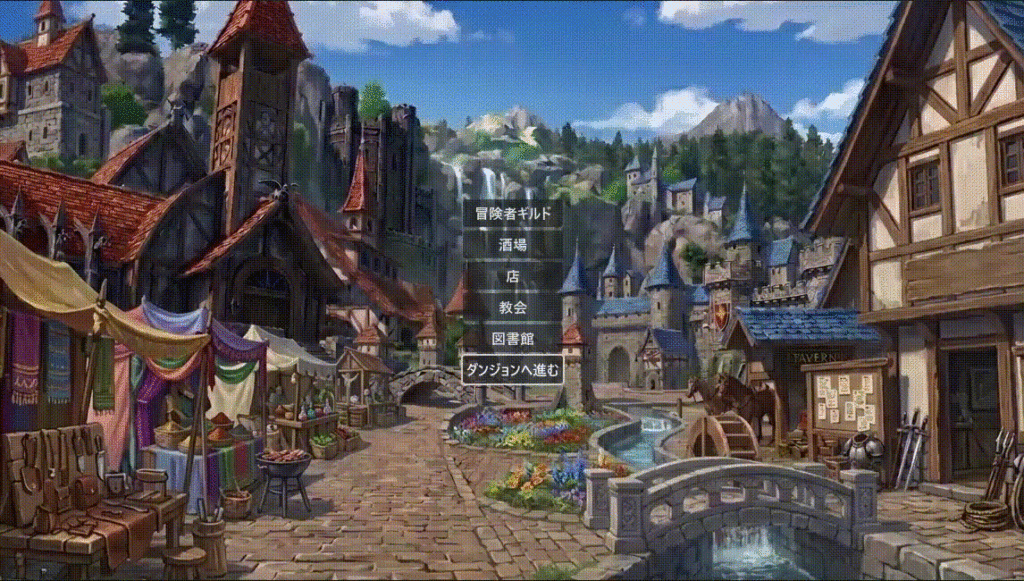
ここまではダンジョンには壁と床、扉と階段があるだけでした。階段マスに移動しても、階段を降りたり登ったりすることはできないようになっています。この記事に書かれていることを実行することで、その階段の昇り降りができるようになります。このフロア遷移、具体的には以下の2つです。この2つができれば、B3 以降も実装できるようになるでしょう。
- ダンジョンのB1から街に戻る処理
- ダンジョンのB1からB2へ降りる処理
ここまでのダンジョンRPG制作で作成したものは以下の通りです。
- ダンジョンの壁と床の設置
- プレイヤーの現在座標とその表記
- イベントメッセージの表示
- 敵とのランダムエンカウント
- ダンジョンの扉と階段の設置
詳しくは以下の別記事をご参照ください。
B1から街に戻る処理
ここではダンジョンRPGにおける「B1から街に戻る」処理について、順番にお伝えしていきます。
ダンジョンに昇り階段を設置
ダンジョンに昇り階段を設置しましょう。このフロアは B1 という設定なので、昇り階段は街に戻るものです。
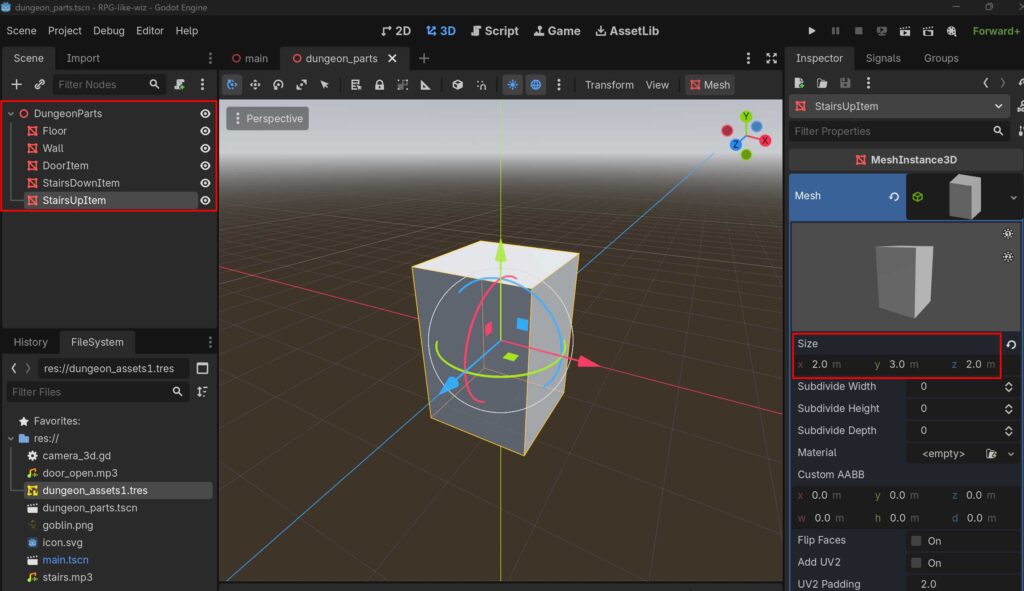
DungeonParts のソースシーンを開き、新しく MeshInstance3D を追加、名前を StairsUpItem にします。StairsUpItem の Size を X:2.0m, Y:3.0m, Z:2.0 にしています。
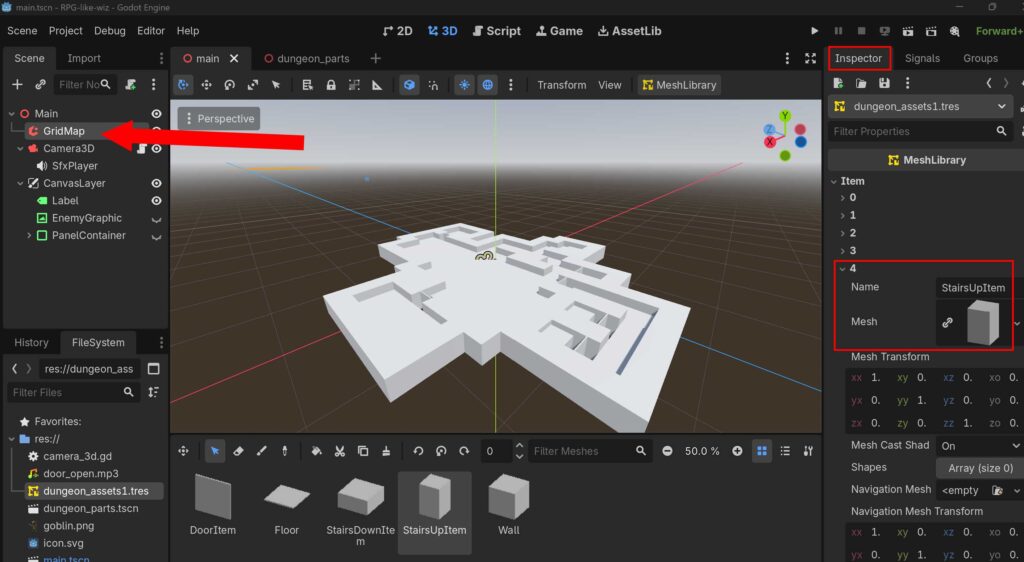
ItemID を確認してください。(前回記事で作成した StarisItem を StairsDownItem に変更しています)
| StairsDownItem | ItemID: 3 |
| StairsUpItem | ItemID: 4 |
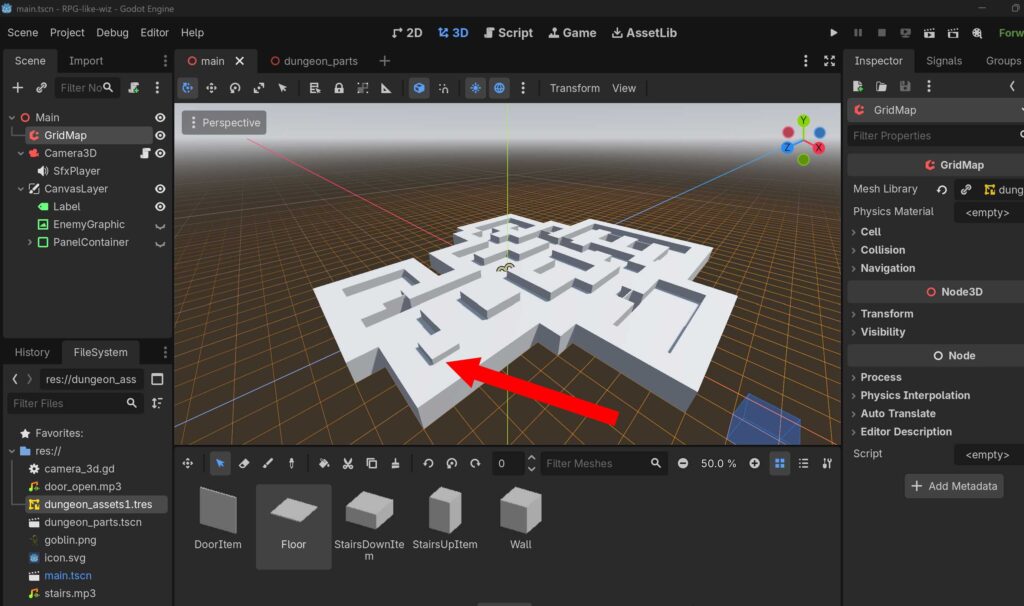
ダンジョンに昇り階段を設置します。
前回記事でもお伝えした通り、この階段は仮置き用として作成しています。後の工程で、階段の3Dモデルや2D画像(テクスチャ)に差し替える予定です。今は気にしないでください。
コードの修正
extends Camera3D

enum Direction { NORTH, EAST, SOUTH, WEST }
enum GameState { EXPLORE, BATTLE }

const MOVE_STEP: float = 2.0
const ROTATE_STEP: float = 90.0

const WALL_ITEM_ID: int = 1
const DOOR_ITEM_ID: int = 2
const STAIRS_DOWN_ITEM_ID: int = 3 # 💡 分かりやすく DOWN に名前を変更(ID: 3)
const STAIRS_UP_ITEM_ID: int = 4   # 💡 新規追加:上り階段のアイテムID(4番)

const MIN_SAFE_STEPS: int = 8
const BASE_ENCOUNTER_CHANCE: float = 0.02

const SFX_DOOR_OPEN = preload("res://door_open.mp3")
const SFX_STAIRS    = preload("res://stairs.mp3")

var current_grid_pos: Vector2i = Vector2i.ZERO
var current_dir: Direction = Direction.NORTH
var is_showing_message: bool = false
var triggered_events: Dictionary = {}
var steps_since_last_fight: int = 0
var current_state: GameState = GameState.EXPLORE
var opened_doors: Dictionary = {}

# 💡 1 = B1, 2 = B2, 0 = 街(城下町)
var current_floor: int = 1

@onready var grid_map: GridMap = $"../GridMap"
@onready var status_label: Label = $"../CanvasLayer/Label"
@onready var message_window: PanelContainer = $"../CanvasLayer/PanelContainer"
@onready var enemy_graphic: TextureRect = $"../CanvasLayer/EnemyGraphic"
@onready var sfx_player: AudioStreamPlayer = $SfxPlayer

@onready var battle_text: Label = $"../CanvasLayer/PanelContainer/BattleMenu/BattleText"
@onready var attack_button: Button = $"../CanvasLayer/PanelContainer/BattleMenu/AttackButton"
@onready var auto_button: Button = $"../CanvasLayer/PanelContainer/BattleMenu/AutoButton"
@onready var flee_button: Button = $"../CanvasLayer/PanelContainer/BattleMenu/FleeButton"

func _ready() -> void:
	update_player_status()
	if message_window:
		message_window.hide()
	if enemy_graphic:
		enemy_graphic.hide()
	steps_since_last_fight = 0

	attack_button.pressed.connect(_on_attack_button_pressed)
	auto_button.pressed.connect(_on_auto_button_pressed)
	flee_button.pressed.connect(_on_flee_button_pressed)

func _unhandled_input(event: InputEvent) -> void:
	if not event.is_pressed() or event.is_echo():
		return

	if current_state == GameState.BATTLE:
		return

	if is_showing_message:
		if event.is_action_pressed("move_forward"):
			close_message_window()
		return

	if event.is_action_pressed("move_forward"):
		try_move_direction(Vector3(0, 0, -1))
	elif event.is_action_pressed("move_backward"):
		try_move_direction(Vector3(0, 0, 1))
	elif event.is_action_pressed("move_left"):
		try_move_direction(Vector3(-1, 0, 0))
	elif event.is_action_pressed("move_right"):
		try_move_direction(Vector3(1, 0, 0))
	elif event.is_action_pressed("turn_left"):
		rotate_horizontal(ROTATE_STEP)
	elif event.is_action_pressed("turn_right"):
		rotate_horizontal(-ROTATE_STEP)

func try_move_direction(local_direction: Vector3) -> void:
	var direction_vector: Vector3 = global_transform.basis * local_direction
	direction_vector.y = 0
	direction_vector = direction_vector.normalized()

	var target_global_pos: Vector3 = global_position + (direction_vector * MOVE_STEP)
	var map_coord: Vector3i = grid_map.local_to_map(grid_map.to_local(target_global_pos))
	var cell_item_id: int = grid_map.get_cell_item(map_coord)

	if cell_item_id == WALL_ITEM_ID:
		return

	if cell_item_id == DOOR_ITEM_ID:
		if not opened_doors.has(map_coord):
			interact_with_door(map_coord)

	global_position = target_global_pos
	update_player_status()

	var current_map_coord: Vector3i = grid_map.local_to_map(grid_map.to_local(global_position))
	var current_cell_id: int = grid_map.get_cell_item(current_map_coord)

	# 💡 【下り階段】の判定
	if current_cell_id == STAIRS_DOWN_ITEM_ID:
		change_floor(-1) # 1つ深い階層へ
		return

	# 💡 【上り階段】の判定
	if current_cell_id == STAIRS_UP_ITEM_ID:
		change_floor(1) # 1つ浅い階層(街の方向)へ
		return

	if current_cell_id == DOOR_ITEM_ID and not opened_doors.has(current_map_coord):
		return

	var event_triggered: bool = check_coordinate_event()
	if not event_triggered:
		check_random_encounter()

func interact_with_door(door_coord: Vector3i) -> void:
	opened_doors[door_coord] = true
	if sfx_player and SFX_DOOR_OPEN:
		sfx_player.stream = SFX_DOOR_OPEN
		sfx_player.play()
	grid_map.set_cell_item(door_coord, GridMap.INVALID_CELL_ITEM)

# 💡 【ロジック拡張】上り・下りを統合した階層移動システム
# type: -1 = 下りる, 1 = 上る
func change_floor(type: int) -> void:
	steps_since_last_fight = 0

	if sfx_player and SFX_STAIRS:
		sfx_player.stream = SFX_STAIRS
		sfx_player.play()

	if type == -1:
		# 🕳️ 地下へ降りる処理 (B1 -> B2)
		current_floor += 1
		show_explore_message("階段を下りた…… 🕳️\nここは B%d だ。\n\n(Wボタンでメッセージを閉じる)" % current_floor)
	elif type == 1:
		# 🏰 地上(街)方向へ登る処理
		current_floor -= 1
		if current_floor == 0:
			# 💡 B1から登ると「街」に帰還する(Wizの城塞都市への帰還を再現)
			show_explore_message("光が差し込む。階段を上り詰め、無事に【街】へ帰還した! 🏰\n冒険の疲れを癒やそう。\n\n(Wボタンで街を出て、再びB1の探索へ戻ります)")
			# ※ミニマム運用のテストのため、再度Wを押すとB1に戻るループ構造にしています
			current_floor = 1
		else:
			# もしB2からB1へ上がった場合など
			show_explore_message("階段を上った…… 🧗\nここは B%d だ。\n\n(Wボタンでメッセージを閉じる)" % current_floor)

	update_ui_display()

func rotate_horizontal(deg: float) -> void:
	rotate_y(deg_to_rad(deg))
	update_player_status()

func update_player_status() -> void:
	if not is_inside_tree():
		return

	var map_coord: Vector3i = grid_map.local_to_map(grid_map.to_local(global_position))
	current_grid_pos = Vector2i(map_coord.x, map_coord.z)

	var forward_vector: Vector3 = -global_transform.basis.z

	if abs(forward_vector.z) > abs(forward_vector.x):
		if forward_vector.z < -0.5:
			current_dir = Direction.NORTH
		else:
			current_dir = Direction.SOUTH
	else:
		if forward_vector.x > 0.5:
			current_dir = Direction.EAST
		else:
			current_dir = Direction.WEST

	update_ui_display()

func update_ui_display() -> void:
	if status_label == null:
		return

	var dir_string: String = ""
	match current_dir:
		Direction.NORTH: dir_string = "北"
		Direction.EAST:  dir_string = "東"
		Direction.SOUTH: dir_string = "南"
		Direction.WEST:  dir_string = "西"

	status_label.text = "B%d | 現在地: (X: %d, Y: %d) | 向き: %s" % [current_floor, current_grid_pos.x, current_grid_pos.y, dir_string]

func check_coordinate_event() -> bool:
	var events: Dictionary = {
		Vector2i(0, -2): {
			"message": "「前方に不気味な気配を感じる…」\n\n(Wボタンで閉じる)",
			"is_repeatable": false
		},
		Vector2i(2, -4): {
			"message": "壁に血文字が刻まれている。\n『引き返せ、この先は深淵なり』\n\n(Wボタンで閉じる)",
			"is_repeatable": false
		},
		Vector2i(1, -1): {
			"message": "足元でカチリと音がした!\nピピッ!マスの罠が作動した!\n\n(Wボタンで閉じる)",
			"is_repeatable": true
		}
	}

	if not events.has(current_grid_pos):
		return false

	var event_data: Dictionary = events[current_grid_pos]

	if not event_data["is_repeatable"]:
		if triggered_events.has(current_grid_pos) and triggered_events[current_grid_pos] == true:
			return false

	show_explore_message(event_data["message"])

	if not event_data["is_repeatable"]:
		triggered_events[current_grid_pos] = true

	return true

func check_random_encounter() -> void:
	steps_since_last_fight += 1
	if steps_since_last_fight <= MIN_SAFE_STEPS:
		return

	var current_chance: float = BASE_ENCOUNTER_CHANCE * (steps_since_last_fight - MIN_SAFE_STEPS)
	var roll: float = randf()

	print("歩数: %d | 遭遇確率: %d%% | 出目: %d%%" % [steps_since_last_fight, int(current_chance * 100), int(roll * 100)])

	if roll < current_chance:
		trigger_battle_encounter()

func show_explore_message(text: String) -> void:
	battle_text.text = text
	attack_button.hide()
	auto_button.hide()
	flee_button.hide()
	message_window.show()
	is_showing_message = true

func trigger_battle_encounter() -> void:
	current_state = GameState.BATTLE
	steps_since_last_fight = 0

	battle_text.text = "ゴブリンが現れた!\nコマンドを選択してください。"
	attack_button.show()
	auto_button.show()
	flee_button.show()

	message_window.show()

	if enemy_graphic:
		enemy_graphic.show()

	attack_button.grab_focus()

func close_message_window() -> void:
	message_window.hide()
	is_showing_message = false

func _on_attack_button_pressed() -> void:
	if current_state != GameState.BATTLE: return
	battle_text.text = "パーティメンバーのコマンドへ (未実装)"

func _on_auto_button_pressed() -> void:
	if current_state != GameState.BATTLE: return
	battle_text.text = "オートバトルへ (未実装)"

func _on_flee_button_pressed() -> void:
	if current_state != GameState.BATTLE: return
	current_state = GameState.EXPLORE
	message_window.hide()
	if enemy_graphic:
		enemy_graphic.hide()
	print("無事に逃げ切った!探索に戻ります。")
コード (camera_3d.gd) を上記のように書き換えます。このコードは上に上がる階段のマスに移動すると、街に戻ったというメッセージと効果音が出ます。(下に降りる階段のメッセージと効果音はそのままです)
B1から階段を昇り街に戻る処理
次はB1に配置した昇り階段のマスに移動すると街に戻る処理についてです。
- 街の背景画像インポート
- コントロールノードの追加
- コードの修正
街の背景画像インポート
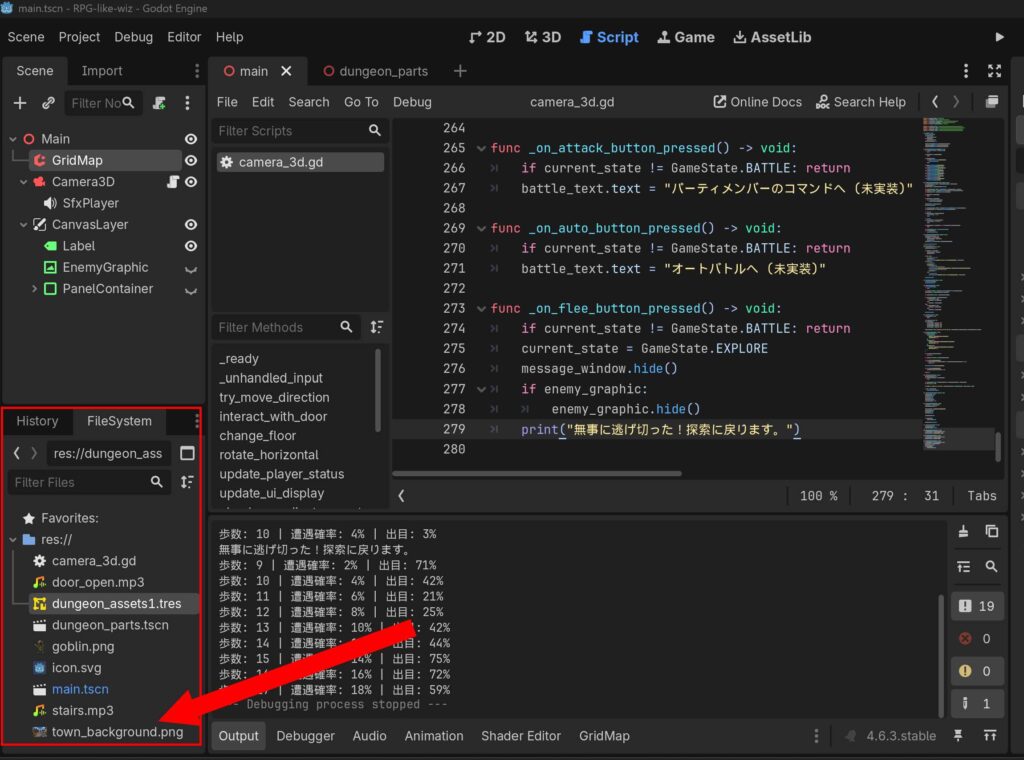
街の背景画像を用意し、その背景画像をインポートしてください。FileSystem にファイルをドラッグ&ドロップでインポート可能です。ここでは背景画像を town_background.png としています。
コントロールノードの追加
新しいUI用のパネルを作ります。
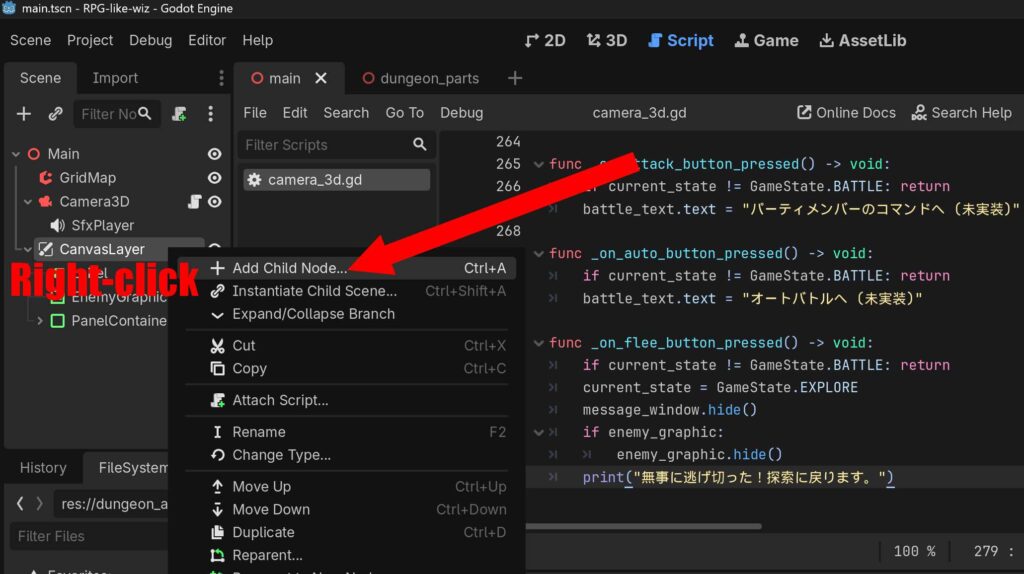
Main シーンを開き CanvasLayer ノードから Add Child Node を選択します。
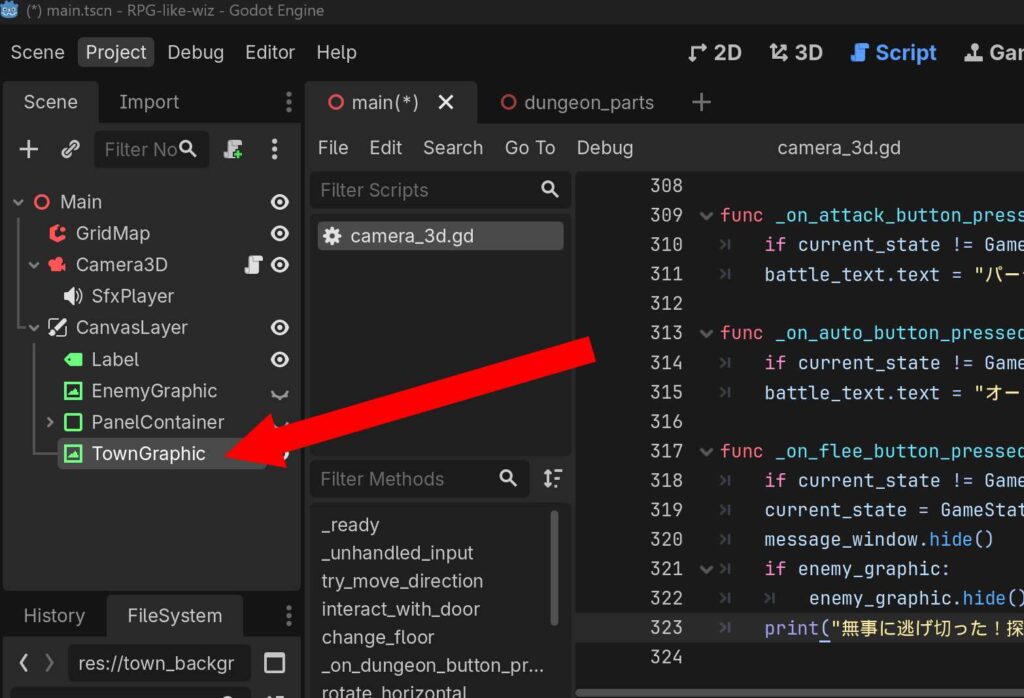
TextureRect を作成してください。追加した TextureRect の名前を TownGraphic に変更します。

TownGraphic (TextureRect) を選択し、画面右側の Inspector の Texture に用意した街の背景画像 (town_background.png) をドラッグ&ドロップしてください。そのあと Control > Layout > Anchors Preset から Full React を選択します。
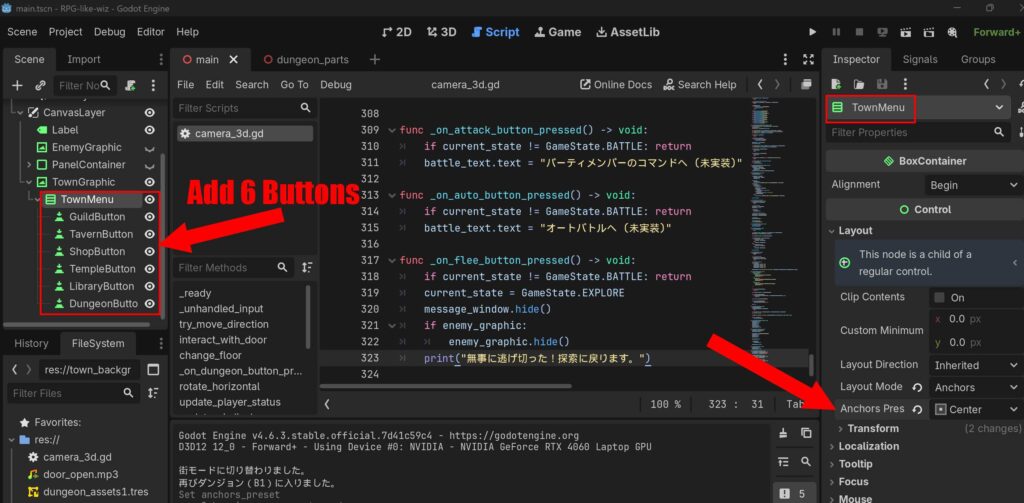
TownGraphic に子ノードとして VBoxContainer を追加し、名前を TownMenu に変更します。TownMenu は上図を参考にメニュー位置を変更しておきましょう。次に、TownMenu に Child Node として Button を 6つ 追加します。6つのボタンの名前とインスペクターの Text 欄を、上から順番に以下のように設定します。
| GuildButton | 冒険者ギルド |
| TavernButton | 酒場 |
| ShopButton | 店 |
| TempleButton | 教会 |
| LibraryButton | 図書館 |
| DungeonButton | ダンジョンへ進む |
コードの修正
extends Camera3D

enum Direction { NORTH, EAST, SOUTH, WEST }
# 💡 ゲーム状態に TOWN(街)を追加
enum GameState { EXPLORE, BATTLE, TOWN }

const MOVE_STEP: float = 2.0
const ROTATE_STEP: float = 90.0

const WALL_ITEM_ID: int = 1
const DOOR_ITEM_ID: int = 2
const STAIRS_DOWN_ITEM_ID: int = 3
const STAIRS_UP_ITEM_ID: int = 4

const MIN_SAFE_STEPS: int = 8
const BASE_ENCOUNTER_CHANCE: float = 0.02

const SFX_DOOR_OPEN = preload("res://door_open.mp3")
const SFX_STAIRS    = preload("res://stairs.mp3")

var current_grid_pos: Vector2i = Vector2i.ZERO
var current_dir: Direction = Direction.NORTH
var is_showing_message: bool = false
var triggered_events: Dictionary = {}
var steps_since_last_fight: int = 0
var current_state: GameState = GameState.EXPLORE
var opened_doors: Dictionary = {}
var current_floor: int = 1

# 💡 スタート時のプレイヤーの初期座標と向きを記憶(街からダンジョンに戻る用)
var dungeon_start_position: Vector3
var dungeon_start_rotation: Vector3

@onready var grid_map: GridMap = $"../GridMap"
@onready var status_label: Label = $"../CanvasLayer/Label"
@onready var message_window: PanelContainer = $"../CanvasLayer/PanelContainer"
@onready var enemy_graphic: TextureRect = $"../CanvasLayer/EnemyGraphic"
@onready var sfx_player: AudioStreamPlayer = $SfxPlayer

# 💡 【新規】街のUIノードへの参照
@onready var town_graphic: TextureRect = $"../CanvasLayer/TownGraphic"
@onready var town_menu: VBoxContainer = $"../CanvasLayer/TownGraphic/TownMenu"
@onready var dungeon_button: Button = $"../CanvasLayer/TownGraphic/TownMenu/DungeonButton"

@onready var battle_text: Label = $"../CanvasLayer/PanelContainer/BattleMenu/BattleText"
@onready var attack_button: Button = $"../CanvasLayer/PanelContainer/BattleMenu/AttackButton"
@onready var auto_button: Button = $"../CanvasLayer/PanelContainer/BattleMenu/AutoButton"
@onready var flee_button: Button = $"../CanvasLayer/PanelContainer/BattleMenu/FleeButton"

func _ready() -> void:
	# 起動時の初期位置を保存しておく
	dungeon_start_position = global_position
	dungeon_start_rotation = global_rotation

	update_player_status()
	if message_window:
		message_window.hide()
	if enemy_graphic:
		enemy_graphic.hide()

	# 💡 最初は街のUIを非表示にして探索からスタート
	if town_graphic:
		town_graphic.hide()

	steps_since_last_fight = 0

	attack_button.pressed.connect(_on_attack_button_pressed)
	auto_button.pressed.connect(_on_auto_button_pressed)
	flee_button.pressed.connect(_on_flee_button_pressed)

	# 💡 【新規】ダンジョンへ進むボタンのシグナル接続
	if dungeon_button:
		dungeon_button.pressed.connect(_on_dungeon_button_pressed)

func _unhandled_input(event: InputEvent) -> void:
	if not event.is_pressed() or event.is_echo():
		return

	# 💡 街状態、または戦闘状態の時はキーボードによる移動・旋回を完全にロックする
	if current_state == GameState.TOWN or current_state == GameState.BATTLE:
		return

	if is_showing_message:
		if event.is_action_pressed("move_forward"):
			close_message_window()
		return

	if event.is_action_pressed("move_forward"):
		try_move_direction(Vector3(0, 0, -1))
	elif event.is_action_pressed("move_backward"):
		try_move_direction(Vector3(0, 0, 1))
	elif event.is_action_pressed("move_left"):
		try_move_direction(Vector3(-1, 0, 0))
	elif event.is_action_pressed("move_right"):
		try_move_direction(Vector3(1, 0, 0))
	elif event.is_action_pressed("turn_left"):
		rotate_horizontal(ROTATE_STEP)
	elif event.is_action_pressed("turn_right"):
		rotate_horizontal(-ROTATE_STEP)

func try_move_direction(local_direction: Vector3) -> void:
	var direction_vector: Vector3 = global_transform.basis * local_direction
	direction_vector.y = 0
	direction_vector = direction_vector.normalized()

	var target_global_pos: Vector3 = global_position + (direction_vector * MOVE_STEP)
	var map_coord: Vector3i = grid_map.local_to_map(grid_map.to_local(target_global_pos))
	var cell_item_id: int = grid_map.get_cell_item(map_coord)

	if cell_item_id == WALL_ITEM_ID:
		return

	if cell_item_id == DOOR_ITEM_ID:
		if not opened_doors.has(map_coord):
			interact_with_door(map_coord)

	global_position = target_global_pos
	update_player_status()

	var current_map_coord: Vector3i = grid_map.local_to_map(grid_map.to_local(global_position))
	var current_cell_id: int = grid_map.get_cell_item(current_map_coord)

	if current_cell_id == STAIRS_DOWN_ITEM_ID:
		change_floor(-1)
		return

	if current_cell_id == STAIRS_UP_ITEM_ID:
		change_floor(1)
		return

	if current_cell_id == DOOR_ITEM_ID and not opened_doors.has(current_map_coord):
		return

	var event_triggered: bool = check_coordinate_event()
	if not event_triggered:
		check_random_encounter()

func interact_with_door(door_coord: Vector3i) -> void:
	opened_doors[door_coord] = true
	if sfx_player and SFX_DOOR_OPEN:
		sfx_player.stream = SFX_DOOR_OPEN
		sfx_player.play()
	grid_map.set_cell_item(door_coord, GridMap.INVALID_CELL_ITEM)

func change_floor(type: int) -> void:
	steps_since_last_fight = 0

	if sfx_player and SFX_STAIRS:
		sfx_player.stream = SFX_STAIRS
		sfx_player.play()

	if type == -1:
		current_floor += 1
		show_explore_message("階段を下りた…… 🕳️\nここは B%d だ。\n\n(Wボタンでメッセージを閉じる)" % current_floor)
	elif type == 1:
		current_floor -= 1
		if current_floor == 0:
			# 💡 【街への遷移ロジック】
			current_state = GameState.TOWN
			if town_graphic:
				town_graphic.show() # 街の画像と6つのボタンを表示
			if dungeon_button:
				dungeon_button.grab_focus() # ボタン選択にフォーカスをあてる
			print("街モードに切り替わりました。")
		else:
			show_explore_message("階段を上った…… 🧗\nここは B%d だ。\n\n(Wボタンでメッセージを閉じる)" % current_floor)

	update_ui_display()

# _on_dungeon_button_pressed 関数 (街からダンジョン)
func _on_dungeon_button_pressed() -> void:
	if current_state != GameState.TOWN:
		return

	# ダンジョンに潜る瞬間にも、階段の音を鳴らす
	if sfx_player and SFX_STAIRS:
		sfx_player.stream = SFX_STAIRS
		sfx_player.play()

	# ゲーム状態を探索に戻し、街のUIを隠す
	current_state = GameState.EXPLORE
	current_floor = 1 # B1に設定

	if town_graphic:
		town_graphic.hide()

	# プレイヤーをダンジョンの初期位置に再配置する
	global_position = dungeon_start_position
	global_rotation = dungeon_start_rotation

	# 歩数カウンタをリフレッシュ
	steps_since_last_fight = 0

	update_player_status()
	print("ダンジョン(B1)に入りました。")

func rotate_horizontal(deg: float) -> void:
	rotate_y(deg_to_rad(deg))
	update_player_status()

func update_player_status() -> void:
	if not is_inside_tree():
		return

	var map_coord: Vector3i = grid_map.local_to_map(grid_map.to_local(global_position))
	current_grid_pos = Vector2i(map_coord.x, map_coord.z)

	var forward_vector: Vector3 = -global_transform.basis.z

	if abs(forward_vector.z) > abs(forward_vector.x):
		if forward_vector.z < -0.5:
			current_dir = Direction.NORTH
		else:
			current_dir = Direction.SOUTH
	else:
		if forward_vector.x > 0.5:
			current_dir = Direction.EAST
		else:
			current_dir = Direction.WEST

	update_ui_display()

func update_ui_display() -> void:
	if status_label == null:
		return

	# 💡 街にいるときはUIの表記を「TOWN」にする
	if current_state == GameState.TOWN:
		status_label.text = "TOWN | 拠点に滞在中"
		return

	var dir_string: String = ""
	match current_dir:
		Direction.NORTH: dir_string = "北"
		Direction.EAST:  dir_string = "東"
		Direction.SOUTH: dir_string = "南"
		Direction.WEST:  dir_string = "西"

	status_label.text = "B%d | 現在地: (X: %d, Y: %d) | 向き: %s" % [current_floor, current_grid_pos.x, current_grid_pos.y, dir_string]

func check_coordinate_event() -> bool:
	var events: Dictionary = {
		Vector2i(0, -2): {
			"message": "「前方に不気味な気配を感じる…」\n\n(Wボタンで閉じる)",
			"is_repeatable": false
		},
		Vector2i(2, -4): {
			"message": "壁に血文字が刻まれている。\n『引き返せ、この先は深淵なり』\n\n(Wボタンで閉じる)",
			"is_repeatable": false
		},
		Vector2i(1, -1): {
			"message": "足元でカチリと音がした!\nピピッ!マスの罠が作動した!\n\n(Wボタンで閉じる)",
			"is_repeatable": true
		}
	}

	if not events.has(current_grid_pos):
		return false

	var event_data: Dictionary = events[current_grid_pos]

	if not event_data["is_repeatable"]:
		if triggered_events.has(current_grid_pos) and triggered_events[current_grid_pos] == true:
			return false

	show_explore_message(event_data["message"])

	if not event_data["is_repeatable"]:
		triggered_events[current_grid_pos] = true

	return true

func check_random_encounter() -> void:
	steps_since_last_fight += 1
	if steps_since_last_fight <= MIN_SAFE_STEPS:
		return

	var current_chance: float = BASE_ENCOUNTER_CHANCE * (steps_since_last_fight - MIN_SAFE_STEPS)
	var roll: float = randf()

	print("歩数: %d | 遭遇確率: %d%% | 出目: %d%%" % [steps_since_last_fight, int(current_chance * 100), int(roll * 100)])

	if roll < current_chance:
		trigger_battle_encounter()

func show_explore_message(text: String) -> void:
	battle_text.text = text
	attack_button.hide()
	auto_button.hide()
	flee_button.hide()
	message_window.show()
	is_showing_message = true

func trigger_battle_encounter() -> void:
	current_state = GameState.BATTLE
	steps_since_last_fight = 0

	battle_text.text = "ゴブリンが現れた!\nコマンドを選択してください。"
	attack_button.show()
	auto_button.show()
	flee_button.show()

	message_window.show()

	if enemy_graphic:
		enemy_graphic.show()

	attack_button.grab_focus()

func close_message_window() -> void:
	message_window.hide()
	is_showing_message = false

func _on_attack_button_pressed() -> void:
	if current_state != GameState.BATTLE: return
	battle_text.text = "パーティメンバーのコマンドへ (未実装)"

func _on_auto_button_pressed() -> void:
	if current_state != GameState.BATTLE: return
	battle_text.text = "オートバトルへ (未実装)"

func _on_flee_button_pressed() -> void:
	if current_state != GameState.BATTLE: return
	current_state = GameState.EXPLORE
	message_window.hide()
	if enemy_graphic:
		enemy_graphic.hide()
	print("無事に逃げ切った!探索に戻ります。")
コード (camera_3d.gd) を上記のように書き換えます。これでダンジョンから街に戻る処理ができました。
B1からB2に降りる処理
次に B1フロアから B2フロアに降りる処理に進みましょう。ここでは仮のB2フロアを作ります。B1の下り階段マスに移動すると、B2フロアの上り階段にワープする形です。B2フロアの上り階段に移動すると、B1の下り階段マスにワープします。
GridMap に B2フロアを作成
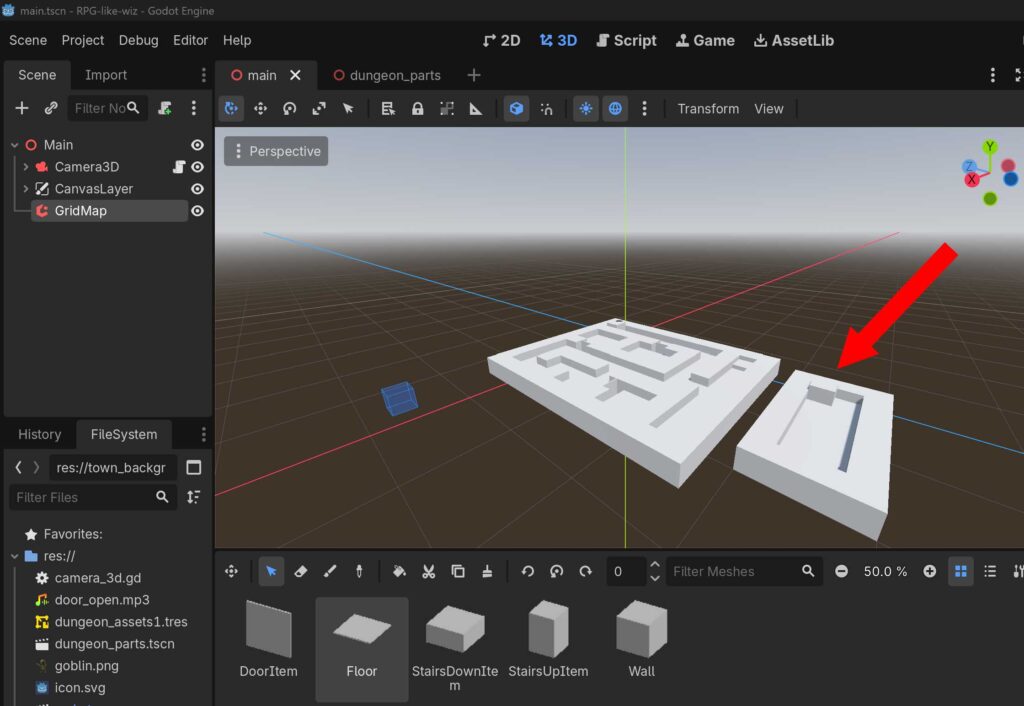
GridMap で仮のB2階を作成してください。今回はB1フロアのすぐ横に作成しました。階段の座標は以下の通りで進めます。
| B1→B2下り階段の座標 | X: 0, Y: 0, Z: -10 |
| B2→B1上り階段の座標 | X: 0, Y: 0, Z: -14 |
B2 に降りる処理
B1の下り階段マスに移動したときに B2 の上り階段マスにワープする処理を行います。同様に B2の上り階段マスに移動したときに B1 の上り階段マスにワープします。
コードの修正
extends Camera3D

enum Direction { NORTH, EAST, SOUTH, WEST }
enum GameState { EXPLORE, BATTLE, TOWN }

const MOVE_STEP: float = 2.0
const ROTATE_STEP: float = 90.0

const WALL_ITEM_ID: int = 1
const DOOR_ITEM_ID: int = 2
const STAIRS_DOWN_ITEM_ID: int = 3
const STAIRS_UP_ITEM_ID: int = 4

const MIN_SAFE_STEPS: int = 8
const BASE_ENCOUNTER_CHANCE: float = 0.02

const SFX_DOOR_OPEN = preload("res://door_open.mp3")
const SFX_STAIRS    = preload("res://stairs.mp3")

var current_grid_pos: Vector2i = Vector2i.ZERO
var current_dir: Direction = Direction.NORTH
var is_showing_message: bool = false
var triggered_events: Dictionary = {}
var steps_since_last_fight: int = 0
var current_state: GameState = GameState.EXPLORE
var opened_doors: Dictionary = {}
var current_floor: int = 1

var dungeon_start_position: Vector3
var dungeon_start_rotation: Vector3

# 💡 【完全確定データ】今後、階層や階段が増えたら「ここにデータを1行足すだけ」で動くマスター辞書
# 構造 ➔ Vector3i(踏んだ階段の座標): { "target_pos": Vector3i(ワープ先の座標), "target_floor": 移動先の階層 }
var STAIRS_LINK_DATA: Dictionary = {
	# --- B1F の階段定義 ---
	Vector3i(0, 0, 0): {
		"target_pos": Vector3i(0, 0, 0), # 街へ戻る階段(フロア0指定で街画面へ)
		"target_floor": 0
	},
	Vector3i(0, 0, -10): {
		"target_pos": Vector3i(0, 0, -14), # 💡 B1下り階段 ➔ B2上り階段の場所へワープ
		"target_floor": 2
	},

	# --- B2F の階段定義 ---
	Vector3i(0, 0, -14): {
		"target_pos": Vector3i(0, 0, -10), # 💡 B2上り階段 ➔ B1下り階段の真上へ(これでOKになります!)
		"target_floor": 1
	}

	# ※今後B3Fへの階段を作った際は、同様に「B2の下り座標」と「B3の上り座標」のペアをここに追記するだけで、システムは一切書き換えずに動作します。
}

@onready var grid_map: GridMap = $"../GridMap"
@onready var status_label: Label = $"../CanvasLayer/Label"
@onready var message_window: PanelContainer = $"../CanvasLayer/PanelContainer"
@onready var enemy_graphic: TextureRect = $"../CanvasLayer/EnemyGraphic"
@onready var sfx_player: AudioStreamPlayer = $SfxPlayer

@onready var town_graphic: TextureRect = $"../CanvasLayer/TownGraphic"
@onready var town_menu: VBoxContainer = $"../CanvasLayer/TownGraphic/TownMenu"
@onready var dungeon_button: Button = $"../CanvasLayer/TownGraphic/TownMenu/DungeonButton"

@onready var battle_text: Label = $"../CanvasLayer/PanelContainer/BattleMenu/BattleText"
@onready var attack_button: Button = $"../CanvasLayer/PanelContainer/BattleMenu/AttackButton"
@onready var auto_button: Button = $"../CanvasLayer/PanelContainer/BattleMenu/AutoButton"
@onready var flee_button: Button = $"../CanvasLayer/PanelContainer/BattleMenu/FleeButton"

func _ready() -> void:
	dungeon_start_position = global_position
	dungeon_start_rotation = global_rotation

	update_player_status()
	if message_window:
		message_window.hide()
	if enemy_graphic:
		enemy_graphic.hide()
	if town_graphic:
		town_graphic.hide()

	steps_since_last_fight = 0

	attack_button.pressed.connect(_on_attack_button_pressed)
	auto_button.pressed.connect(_on_auto_button_pressed)
	flee_button.pressed.connect(_on_flee_button_pressed)

	if dungeon_button:
		dungeon_button.pressed.connect(_on_dungeon_button_pressed)

func _unhandled_input(event: InputEvent) -> void:
	if not event.is_pressed() or event.is_echo():
		return

	if current_state == GameState.TOWN or current_state == GameState.BATTLE:
		return

	if is_showing_message:
		if event.is_action_pressed("move_forward"):
			close_message_window()
		return

	if event.is_action_pressed("move_forward"):
		try_move_direction(Vector3(0, 0, -1))
	elif event.is_action_pressed("move_backward"):
		try_move_direction(Vector3(0, 0, 1))
	elif event.is_action_pressed("move_left"):
		try_move_direction(Vector3(-1, 0, 0))
	elif event.is_action_pressed("move_right"):
		try_move_direction(Vector3(1, 0, 0))
	elif event.is_action_pressed("turn_left"):
		rotate_horizontal(ROTATE_STEP)
	elif event.is_action_pressed("turn_right"):
		rotate_horizontal(-ROTATE_STEP)

func try_move_direction(local_direction: Vector3) -> void:
	var direction_vector: Vector3 = global_transform.basis * local_direction
	direction_vector.y = 0
	direction_vector = direction_vector.normalized()

	var target_global_pos: Vector3 = global_position + (direction_vector * MOVE_STEP)
	var map_coord: Vector3i = grid_map.local_to_map(grid_map.to_local(target_global_pos))
	var cell_item_id: int = grid_map.get_cell_item(map_coord)

	if cell_item_id == WALL_ITEM_ID:
		return

	if cell_item_id == DOOR_ITEM_ID:
		if not opened_doors.has(map_coord):
			interact_with_door(map_coord)

	# 💡 【重要】移動する前の「古いマス座標」を記憶しておく
	var old_map_coord: Vector3i = grid_map.local_to_map(grid_map.to_local(global_position))

	# プレイヤーを実際に移動させる
	global_position = target_global_pos
	update_player_status()

	# 移動した後の「新しいマス座標」を取得
	var current_map_coord: Vector3i = grid_map.local_to_map(grid_map.to_local(global_position))
	var current_cell_id: int = grid_map.get_cell_item(current_map_coord)

	# 💡 【解決策】「前いたマス」と「今いるマス」が違う(=別のマスに足を踏み入れた)時だけ階段を判定する
	if current_map_coord != old_map_coord:
		if current_cell_id == STAIRS_DOWN_ITEM_ID or current_cell_id == STAIRS_UP_ITEM_ID:
			teleport_by_stairs(current_map_coord)
			return

	if current_cell_id == DOOR_ITEM_ID and not opened_doors.has(current_map_coord):
		return

	var event_triggered: bool = check_coordinate_event()
	if not event_triggered:
		check_random_encounter()

func interact_with_door(door_coord: Vector3i) -> void:
	opened_doors[door_coord] = true
	if sfx_player and SFX_DOOR_OPEN:
		sfx_player.stream = SFX_DOOR_OPEN
		sfx_player.play()
	grid_map.set_cell_item(door_coord, GridMap.INVALID_CELL_ITEM)

# 💡 データ駆動型:踏んだ座標を元に行先を自動判定する汎用ワープシステム
func teleport_by_stairs(current_stair_coord: Vector3i) -> void:
	if not STAIRS_LINK_DATA.has(current_stair_coord):
		print("未定義の階段座標です: ", current_stair_coord)
		return

	steps_since_last_fight = 0

	if sfx_player and SFX_STAIRS:
		sfx_player.stream = SFX_STAIRS
		sfx_player.play()

	var data: Dictionary = STAIRS_LINK_DATA[current_stair_coord]
	var next_floor: int = data["target_floor"]
	var next_pos: Vector3i = data["target_pos"]

	if next_floor == 0:
		# 🏰 街への帰還
		current_state = GameState.TOWN
		if town_graphic:
			town_graphic.show()
		if dungeon_button:
			dungeon_button.grab_focus()
		print("街モードに切り替わりました。")
	else:
		# 🕳️ 階層移動(上り・下りを自動判定してメッセージを分岐)
		var old_floor: int = current_floor
		current_floor = next_floor

		# 💡【重要】GridMapのローカル中心座標を取得し、それをグローバル3D座標に変換する
		var local_target_pos: Vector3 = grid_map.map_to_local(next_pos)
		var global_target_pos: Vector3 = grid_map.to_global(local_target_pos)

		# 💡 プレイヤーの3D位置を確実にワープ先へ書き換える
		global_position = global_target_pos

		# 💡 Godot内部の位置トランスフォームをこの瞬間に強制同期させる(同期ズレの防止)
		force_update_transform()

		# 💡 自動計算のズレを防ぐため、UI用の2Dマス座標も直接ワープ先の数値で上書き確定させる
		current_grid_pos = Vector2i(next_pos.x, next_pos.z)

		if current_floor > old_floor:
			show_explore_message("階段を下りた…… 🕳️\nここは B%d だ。\n\n(Wボタンでメッセージを閉じる)" % current_floor)
		else:
			show_explore_message("階段を上った…… 🧗\nここは B%d だ。\n\n(Wボタンでメッセージを閉じる)" % current_floor)

	# 💡 同期を強制した後に、向きなどのステータスを更新する
	update_player_status()

func _on_dungeon_button_pressed() -> void:
	if current_state != GameState.TOWN:
		return

	if sfx_player and SFX_STAIRS:
		sfx_player.stream = SFX_STAIRS
		sfx_player.play()

	current_state = GameState.EXPLORE
	current_floor = 1

	if town_graphic:
		town_graphic.hide()

	global_position = dungeon_start_position
	global_rotation = dungeon_start_rotation
	steps_since_last_fight = 0

	update_player_status()
	print("再びダンジョン(B1)に入りました。")

func rotate_horizontal(deg: float) -> void:
	rotate_y(deg_to_rad(deg))
	update_player_status()

func update_player_status() -> void:
	if not is_inside_tree():
		return

	var map_coord: Vector3i = grid_map.local_to_map(grid_map.to_local(global_position))
	current_grid_pos = Vector2i(map_coord.x, map_coord.z)

	var forward_vector: Vector3 = -global_transform.basis.z

	if abs(forward_vector.z) > abs(forward_vector.x):
		if forward_vector.z < -0.5:
			current_dir = Direction.NORTH
		else:
			current_dir = Direction.SOUTH
	else:
		if forward_vector.x > 0.5:
			current_dir = Direction.EAST
		else:
			current_dir = Direction.WEST

	update_ui_display()

func update_ui_display() -> void:
	if status_label == null:
		return

	if current_state == GameState.TOWN:
		status_label.text = "TOWN | 拠点に滞年中"
		return

	var dir_string: String = ""
	match current_dir:
		Direction.NORTH: dir_string = "北"
		Direction.EAST:  dir_string = "東"
		Direction.SOUTH: dir_string = "南"
		Direction.WEST:  dir_string = "西"

	status_label.text = "B%d | 現在地: (X: %d, Y: %d) | 向き: %s" % [current_floor, current_grid_pos.x, current_grid_pos.y, dir_string]

func check_coordinate_event() -> bool:
	var events: Dictionary = {
		Vector2i(0, -2): {
			"message": "「前方に不気味な気配を感じる…」\n\n(Wボタンで閉じる)",
			"is_repeatable": false
		},
		Vector2i(2, -4): {
			"message": "壁に血文字が刻まれている。\n『引き返せ、この先は深淵なり』\n\n(Wボタンで閉じる)",
			"is_repeatable": false
		},
		Vector2i(1, -1): {
			"message": "足元でカチリと音がした!\nピピッ!マスの罠が作動した!\n\n(Wボタンで閉じる)",
			"is_repeatable": true
		}
	}

	if not events.has(current_grid_pos):
		return false

	var event_data: Dictionary = events[current_grid_pos]

	if not event_data["is_repeatable"]:
		if triggered_events.has(current_grid_pos) and triggered_events[current_grid_pos] == true:
			return false

	show_explore_message(event_data["message"])

	if not event_data["is_repeatable"]:
		triggered_events[current_grid_pos] = true

	return true

func check_random_encounter() -> void:
	steps_since_last_fight += 1
	if steps_since_last_fight <= MIN_SAFE_STEPS:
		return

	var current_chance: float = BASE_ENCOUNTER_CHANCE * (steps_since_last_fight - MIN_SAFE_STEPS)
	var roll: float = randf()

	print("歩数: %d | 遭遇確率: %d%% | 出目: %d%%" % [steps_since_last_fight, int(current_chance * 100), int(roll * 100)])

	if roll < current_chance:
		trigger_battle_encounter()

func show_explore_message(text: String) -> void:
	battle_text.text = text
	attack_button.hide()
	auto_button.hide()
	flee_button.hide()
	message_window.show()
	is_showing_message = true

func trigger_battle_encounter() -> void:
	current_state = GameState.BATTLE
	steps_since_last_fight = 0

	battle_text.text = "ゴブリンが現れた!\nコマンドを選択してください。"
	attack_button.show()
	auto_button.show()
	flee_button.show()

	message_window.show()

	if enemy_graphic:
		enemy_graphic.show()

	attack_button.grab_focus()

func close_message_window() -> void:
	message_window.hide()
	is_showing_message = false

func _on_attack_button_pressed() -> void:
	if current_state != GameState.BATTLE: return
	battle_text.text = "パーティメンバーのコマンドへ (未実装)"

func _on_auto_button_pressed() -> void:
	if current_state != GameState.BATTLE: return
	battle_text.text = "オートバトルへ (未実装)"

func _on_flee_button_pressed() -> void:
	if current_state != GameState.BATTLE: return
	current_state = GameState.EXPLORE
	message_window.hide()
	if enemy_graphic:
		enemy_graphic.hide()
	print("無事に逃げ切った!探索に戻ります。")
コード (camera_3d.gd) を上記のように書き換えてください。これで B1 から B2 に降りる処理、B2 から B1 に昇る処理を実装することができます。
このコードを見てわかった人もいるのではないでしょうか。この camera_3d.gd のコードに「街の処理」「敵の処理」などカメラ以外の処理も多く含まれています。これはプログラミング的にはよくない構造です。そのため、次の記事ではリファクタリングして修正していきます。




コメント